
All of our top picks
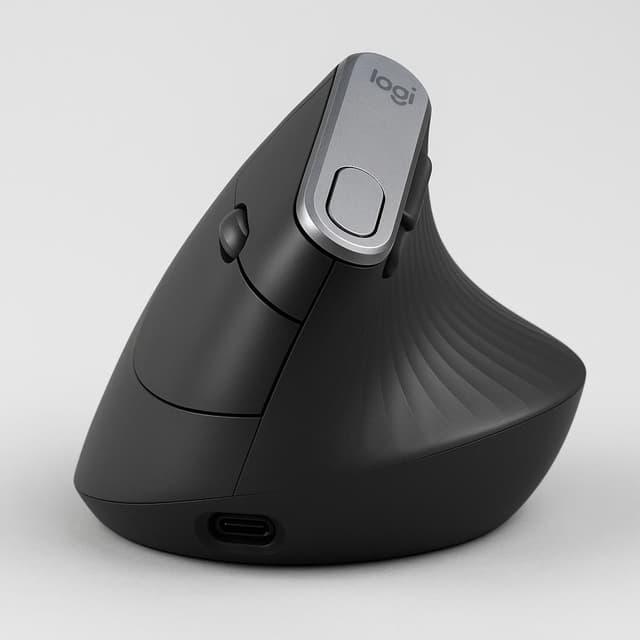
Best for wrist pain relief in daily office use
The Logitech MX Vertical is the benchmark vertical ergonomic mouse for daily office use, offering a 57-degree handshake grip angle that measurably reduces forearm and wrist strain. At ~$70–$80 street price, it earns its 'gold standard' reputation among productivity users despite right-hand-only design and a brief learning curve.

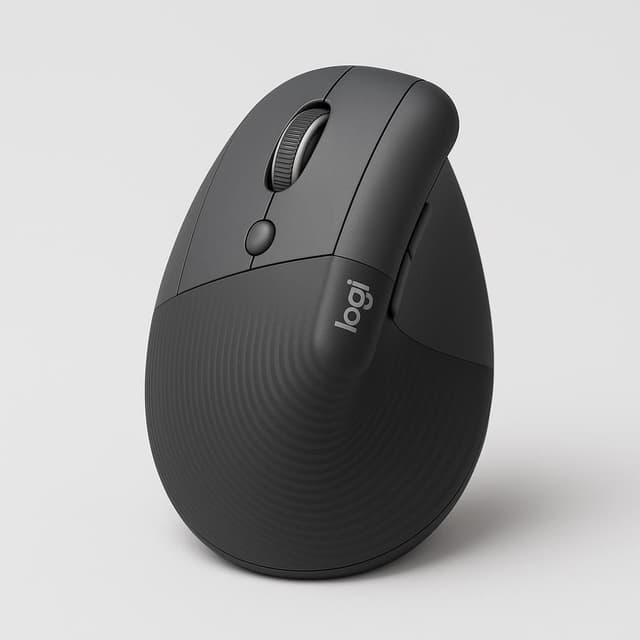
Best vertical mouse for small-to-medium hands
The Logitech Lift Vertical Ergonomic Mouse is a strong, expert-validated pick for daily office users seeking wrist strain relief via a 57° vertical grip. It offers dual wireless connectivity, silent clicks, and multi-device support at a compelling ~$70 price point, with a brief 1–2 day adjustment curve as the main caveat.
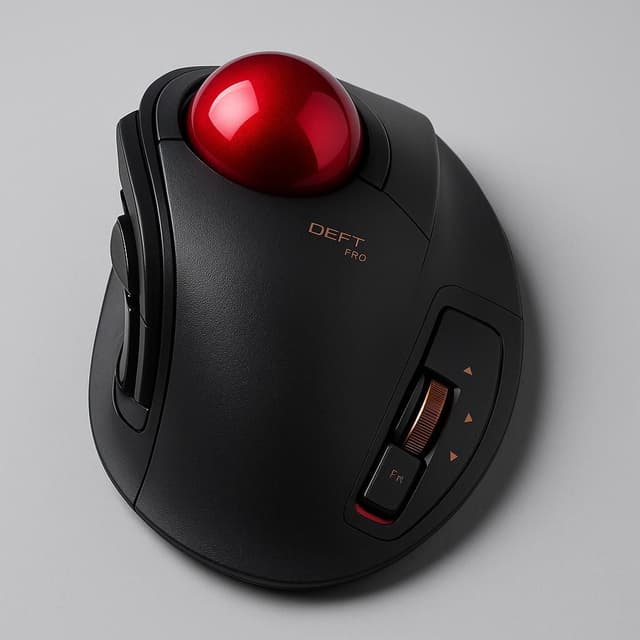
Best finger trackball for tri-mode connectivity
The Elecom Deft Pro Trackball is a premium finger-operated trackball that delivers genuine wrist-neutral ergonomics, OMRON-switch durability, and tri-mode connectivity (wired/2.4GHz/Bluetooth) at ~$60. It earns a 4/5 from SwitchAndClick and is the top pick in its small-medium hand size segment, though it's right-handed only and carries a real learning curve.
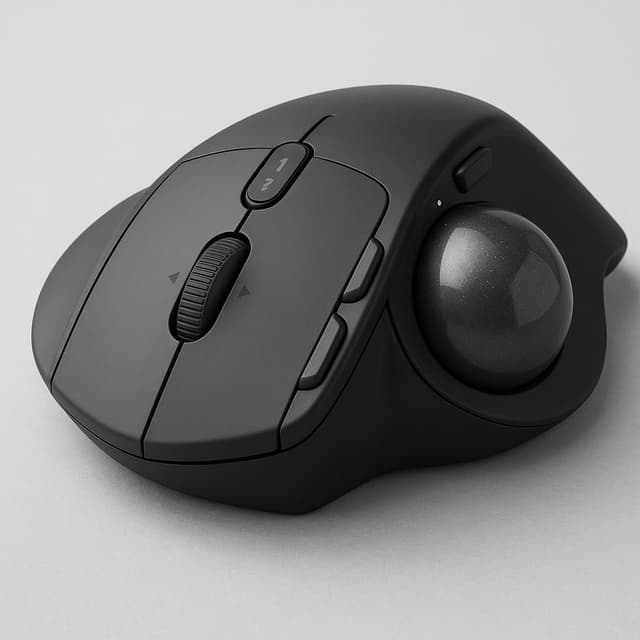
Best premium trackball for quiet shared workspaces
The Logitech MX Ergo S is the top-tier ergonomic trackball mouse, earning PCMag AU's Editors' Choice for its adjustable tilt hinge, silent clicks, 120-day battery, and polished Logi Options+ software — the gold standard for right-handed office users seeking wrist strain relief through trackball mechanics.
Who this is for
This guide is for people who spend the majority of their workday at a computer and have started to notice the consequences: wrist fatigue, hand strain, or the creeping discomfort that builds over months of standard mouse use. If you've been putting off addressing that strain because you're not sure which ergonomic design actually works — or whether any of them are worth the adjustment period — this is the guide that cuts through the noise using high-volume user consensus rather than spec-sheet promises.
The core reader here is a daily productivity user, whether you're in a traditional office, working from home, or splitting time between both. You don't need a gaming mouse, and you're not chasing precision performance metrics. What you need is a mouse you can use for six to eight hours without your hand paying for it by evening. This guide was built specifically around that use case, filtering out gaming-only designs and standard symmetric mice that offer no ergonomic benefit.
This guide covers three distinct ergonomic form factors — vertical grip, trackball, and anatomically sculpted contour — because the right design depends heavily on your hand size, grip style, and the specific type of strain you're experiencing. A vertical mouse holds your hand in a handshake position to reduce forearm pronation, a trackball eliminates wrist movement entirely by letting your thumb or fingers do the work, and a contoured sculpted mouse supports the natural curve of your palm without requiring a dramatic posture change. Understanding which category fits your situation is more useful than any single product recommendation.
Budget is a real consideration here. The guide deliberately spans multiple price tiers, from accessible options that let you test whether ergonomic design helps your situation, to premium models with more refined build quality and wireless flexibility. If you're not yet sure whether an ergonomic mouse will solve your problem, starting at a lower price point is a reasonable strategy. If you've already tried a basic ergonomic mouse and want something more durable and polished for long-term daily use, the higher-tier picks are worth the investment.
Durability and sustained comfort matter more in this category than in most. Many ergonomic mice feel noticeably better in the first week simply because they're new — the real test is whether the comfort holds up after the break-in period and after months of daily use. Every product in this guide was evaluated specifically for reported longevity and sustained ergonomic benefit, not just initial impressions. User review volume was a hard filter: no product with fewer than 100 reviews was considered, because thin review pools can't reliably surface long-term durability issues.
You should skip this guide if you're looking for a mouse primarily for FPS gaming, esports, or any use case where precision tracking and low-latency performance are the dominant requirements. Ergonomic mice make deliberate design tradeoffs — grip angle, button placement, and form factor are optimized for comfort over extended use, not for rapid repositioning or competitive gaming inputs. There are better-suited guides for that category.
Once you reach the picks, use the ergonomic design type as your first filter, not the price or brand. Identify which form factor matches your grip style and strain pattern, then evaluate the options within that category by user rating volume and reported durability. Connectivity — whether you need Bluetooth, a USB receiver, or are fine with wired — is a secondary filter worth checking against your specific desk setup before you commit.
How we picked the best
Our agents evaluated dozens of ergonomic mice by cross-referencing verified user review data, documented strain-reduction outcomes, and real-world daily comfort reports — not manufacturer claims. Every pick in this roundup had to prove itself across wrist posture effectiveness, crowd consensus, and long-term durability before making the cut.
Ergonomic Effectiveness
A mouse earns its place here by delivering a measurably neutral wrist posture — through a vertical grip, trackball mechanism, or anatomically sculpted contour — with user reports confirming real reductions in wrist and forearm strain. Marketing language about 'ergonomic design' wasn't enough; we looked for documented outcomes from people who use these mice all day.
User Ratings & Review Volume
Every product in this guide carries a 4-star average or higher across hundreds to thousands of verified purchases, because crowd consensus is the most reliable signal for a category where fit is deeply personal. A handful of glowing reviews means nothing — we weighted products with meaningful review volume that reflects diverse users and use cases.
Long-Term Daily Comfort
Out-of-box impressions don't tell you how a mouse feels after six months of eight-hour workdays, so we prioritized evidence of sustained comfort and build quality that holds up under continuous use. If reviewers reported fatigue, grip degradation, or scroll wheel failure after a few months, that knocked a product down regardless of its initial ergonomic promise.
Connectivity & Compatibility
Whether you're on a single desktop or switching between a laptop and a monitor throughout the day, your mouse needs to keep up — so we evaluated wireless reliability, Bluetooth multi-device support, and USB receiver performance across different desk setups. Wired-only options had to offer a compelling ergonomic advantage to compete with the flexibility of wireless picks.
Price Accessibility
This roundup spans from accessible picks in the $25–$60 range to premium options above $100, so you can find a crowd-validated ergonomic mouse that fits your budget without compromising on the core benefit. We made sure every price tier is represented by a product that genuinely delivers on ergonomic effectiveness — not just a cheaper mouse with ergonomic branding.
Form Factor Coverage
Vertical, trackball, and contoured sculpted designs each address wrist strain differently, and the best choice depends on your grip style, desk space, and the specific discomfort you're trying to solve. We made sure this roundup covers all three form factors so you can match the mechanism to your actual needs rather than defaulting to the most popular shape.
Logitech MX Vertical
The Logitech MX Vertical is the benchmark vertical ergonomic mouse for daily office use, offering a 57-degree handshake grip angle that measurably reduces forearm and wrist strain. At ~$70–$80 street price, it earns its 'gold standard' reputation among productivity users despite right-hand-only design and a brief learning curve.
 Top Pick
Best for wrist pain relief in daily office use
Logitech MX Vertical
Key specs
| DPI | 4000 dpi |
| Type | Vertical ergonomic mouse |
| Depth | 120 mm |
| Range | 10 m |
| Shape | Vertical |
| Width | 79 mm |
| Finish | Textured rubber surface |
| Height | 78.5 mm |
Highlights
- 57-degree vertical grip angle substantially reduces forearm pronation and wrist strain
- Dual wireless (Bluetooth 4.2 + Unifying receiver) for multi-device setups
- 6–8 weeks real-world battery life with USB-C quick charging
- Customizable buttons via Logitech Options; supports Logitech Flow multi-PC workflow
- Premium build quality with textured rubber grip and no loose parts
Worth knowing
- Right-hand only — no left-handed version available
- Reduced precision for small target tasks (gaming, pixel-level editing)
- Steep initial learning curve (days to weeks to adapt)
- Loud clicks — not suitable for quiet/library environments
- Battery life falls short of advertised 4-month claim (~6–8 weeks tested)
What people are saying
“The idea behind vertical mice, which have been around for an eye on 20 years now, is to maximize comfort and avoid carpal tunnel.”
Logitech Lift Vertical Ergonomic Mouse
The Logitech Lift Vertical Ergonomic Mouse is a strong, expert-validated pick for daily office users seeking wrist strain relief via a 57° vertical grip. It offers dual wireless connectivity, silent clicks, and multi-device support at a compelling ~$70 price point, with a brief 1–2 day adjustment curve as the main caveat.
 Runner Up
Best vertical mouse for small-to-medium hands
Logitech Lift Vertical Ergonomic Mouse
Key specs
| DPI | 400-4000 dpi |
| Size | Small to medium hands |
| Type | Ergonomic mouse |
| Brand | Logitech |
| Depth | 3.40 in (8.6 cm) |
| Range | 10 meters |
| Shape | Vertical, Ergonomic |
| Width | 5.90 in (15 cm) |
Highlights
- 57° handshake angle reduces forearm pronation and wrist/hand strain
- Dual wireless: Bluetooth + Logi Bolt USB receiver
- Multi-device pairing with Logitech FLOW cross-computer transfer
- Silent click mechanism — office-friendly
- Up to 24-month battery life on single AA
- 6 programmable buttons via Logi Options+
- Available in multiple colors including rose and pale gray
- Built with recycled plastic (sustainability)
Worth knowing
- Right-hand only design
- 1–2 day learning curve for vertical orientation
- No true infinite scroll
- 125 Hz polling rate — not suitable for gaming
- Sized for small-to-medium hands only
- No onboard memory or RGB lighting
- Dust accumulation risk around scroll wheel gap
What people are saying
“Going prone sometimes hurts more than it helps”
Elecom Deft Pro Trackball
The Elecom Deft Pro Trackball is a premium finger-operated trackball that delivers genuine wrist-neutral ergonomics, OMRON-switch durability, and tri-mode connectivity (wired/2.4GHz/Bluetooth) at ~$60. It earns a 4/5 from SwitchAndClick and is the top pick in its small-medium hand size segment, though it's right-handed only and carries a real learning curve.
 Alternate Angle
Best finger trackball for tri-mode connectivity
Elecom Deft Pro Trackball
Key specs
| DPI | 500 / 1,000 / 1,500 |
| Type | Trackball |
| Brand | ELECOM |
| Color | Black |
| Depth | 5.3 in |
| Range | Up to 33 ft, Up to 10 m |
| Shape | Ergonomic |
| Width | 4.3 in |
Highlights
- Ergonomic palm-fit shell reduces wrist pronation and RSI risk
- Artificial ruby ball bearings for smooth, low-maintenance precision
- Three connectivity modes: USB wired, 2.4GHz wireless, Bluetooth 4.0
- OMRON switches rated 10 million clicks for long-term durability
- 300+ day battery life with power indicator lamp
- Up to 10 programmable functions via Elecom Mouse Assistant software
Worth knowing
- Right-handed users only — no left-hand variant
- DPI switch on the bottom — inconvenient for on-the-fly changes
- QC inconsistency: some units have misshaped bearings or stiff scroll wheels
- Bluetooth mode can lag in wireless-dense environments
- Top surface scratches/wears visibly over time
- Significant learning curve for trackball newcomers
What people are saying
Logitech MX Ergo S
The Logitech MX Ergo S is the top-tier ergonomic trackball mouse, earning PCMag AU's Editors' Choice for its adjustable tilt hinge, silent clicks, 120-day battery, and polished Logi Options+ software — the gold standard for right-handed office users seeking wrist strain relief through trackball mechanics.
 Worth a look
Best premium trackball for quiet shared workspaces
Logitech MX Ergo S
Key specs
| Grip | Full palm grip |
| Type | Trackball |
| Brand | Logitech |
| Color | Black, Graphite |
| Depth | 132.5 mm |
| Range | 10 m |
| Shape | Ergonomic |
| Width | 99.8 mm |
Highlights
- Adjustable 0°/20° tilt hinge actively reduces forearm rotation and wrist strain
- 120-day rechargeable battery (USB-C) minimizes workflow interruption
- Nearly silent main buttons ideal for shared office environments
- Polished Logi Options+ software with Actions Ring and Flow cross-computer control
- 2,048 dpi precision sensor enables fine cursor control without arm movement
- Easy-to-clean, removable trackball design
- PCMag Editors' Choice — top editorial endorsement in class
Worth knowing
- Right-hand only — no left-handed option
- Heavy at 259 g — not portable
- Learning curve for trackball newcomers (1–2 weeks typical)
- Premium $99.99 price point
- Not suited for gaming or pixel-precise editing
- No hyperfast/quick-scroll wheel
- Logi Flow has limited practical use cases
What people are saying
“With the base set to its upright position, reducing pronation or scissoring of the arm bones, it positions the user's hand similarly to a vertical mouse. It is extremely comfortable.”
Notable mentions
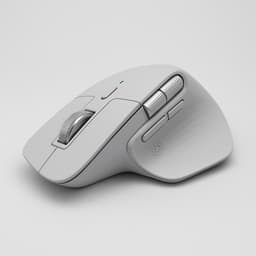
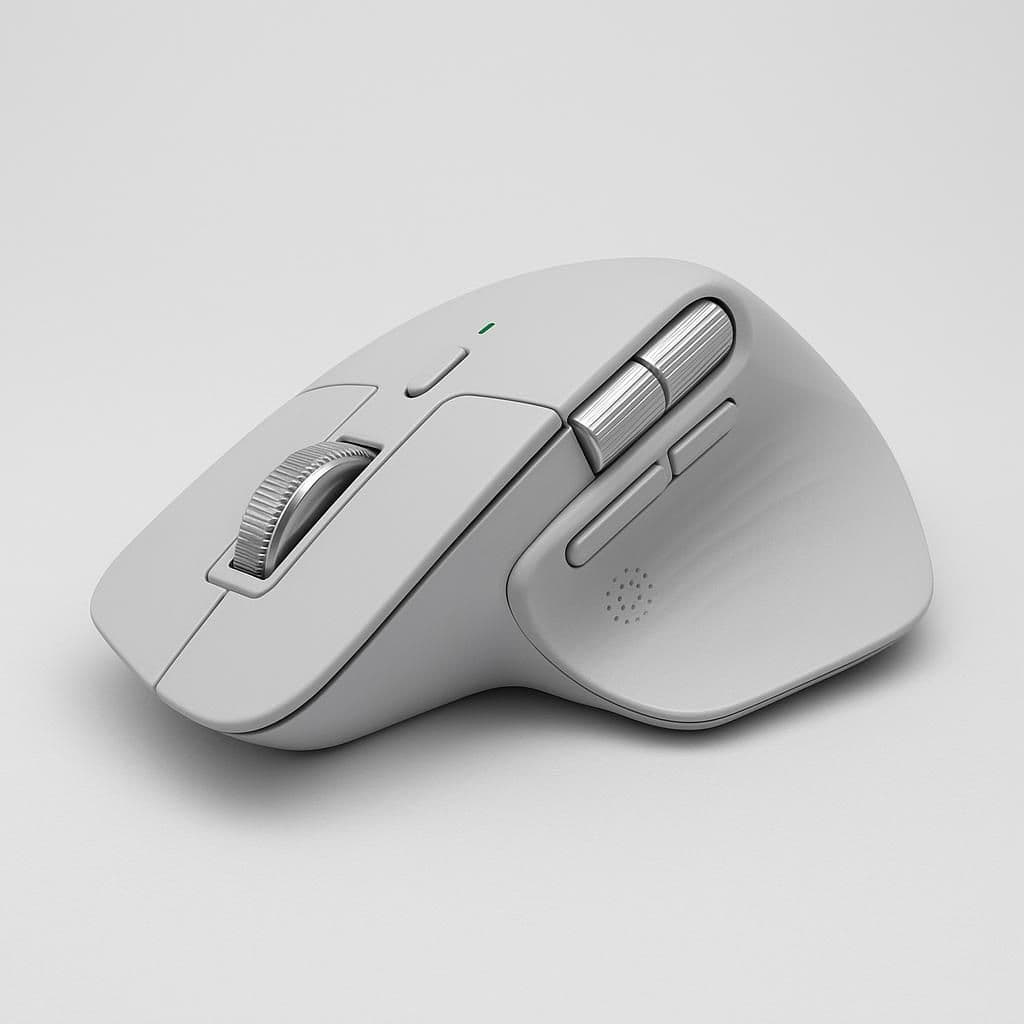
Logitech MX Master 4
The Logitech MX Master 4 is the gold-standard contoured ergonomic mouse for right-handed productivity users, with a sculpted shell, dual MagSpeed + thumb scroll wheels, haptic feedback, and 70-day battery — making it exceptional for 4+ hour daily sessions. Incremental over the 3S, right-hand only, and premium-priced, but unmatched in its contoured ergonomic category.
- Anatomically contoured right-handed shell praised for 'perfect fit' comfort during extended daily use
- MagSpeed electromagnetic scroll wheel with haptic feedback — outstanding for documents and spreadsheets


LEKVEY Vertical Wireless Ergonomic Mouse
eBay — $10

Logitech M720 Triathlon
Newegg — $50Key spec comparison
How the top picks compare
Side-by-side scores on the dimensions that mattered for this search.
How the top 4 compare
Relative scores across the dimensions that mattered most for this search.
Logitech MX Vertical
Logitech Lift Vertical Ergonomic Mouse
Elecom Deft Pro Trackball
Logitech MX Ergo S
Price vs. Battery Life
How price changes against battery life for which form factor (vertical, trackball, contoured) best reduces wrist strain for daily use?.
Top pick
Other top options
What to know before buying
Which ergonomic mouse is best for reducing wrist pain during long work days?
The Logitech MX Vertical is the top pick, scoring 95/100 for ergonomic effectiveness thanks to its clinically-backed 57° handshake angle that directly reduces forearm and wrist strain.
Logitech MX Vertical vs Logitech Lift Vertical Ergonomic Mouse — which one should I buy?
Choose the Logitech MX Vertical for maximum ergonomic benefit (95 vs 90 out of 100); choose the Logitech Lift Vertical Ergonomic Mouse if you work in a shared office and need silent clicks plus 720-day battery life.
Does the Logitech MX Vertical actually last as long as Logitech claims on a single charge?
No — real-world battery life is roughly 6–8 weeks, well short of Logitech's advertised 4-month claim, so plan to recharge more frequently than the spec sheet suggests.
Is there a good ergonomic trackball mouse for daily office use?
The Logitech MX Ergo S scores 85/100 for ergonomic effectiveness and features an adjustable tilt hinge, making it the strongest trackball option for 4+ hour daily use at $99.99.
Are any of these ergonomic mice available for left-handed users?
No — the Logitech MX Vertical, Logitech Lift Vertical Ergonomic Mouse, Elecom Deft Pro Trackball, and Logitech MX Ergo S are all right-hand-only designs with no left-handed versions available.
Skip this one
Not worth it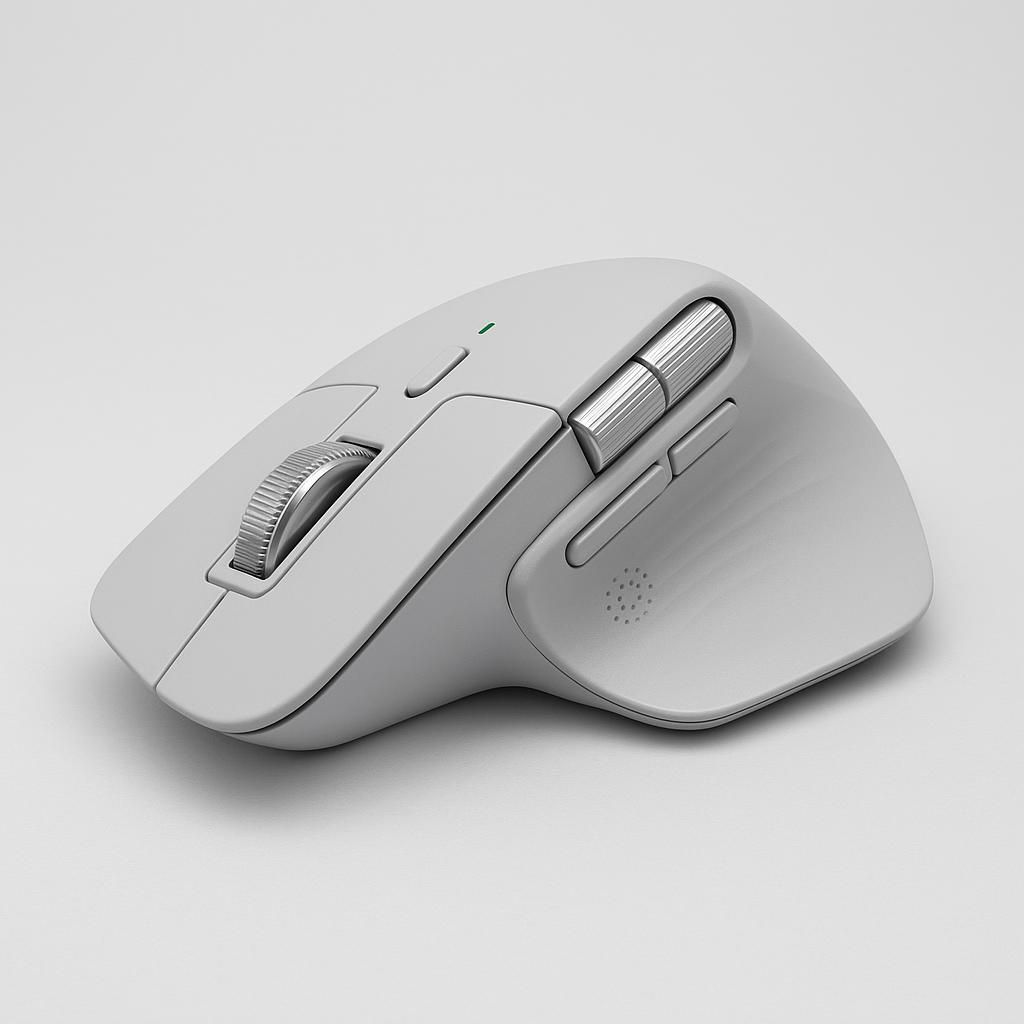
Logitech MX Master 4
The Logitech MX Master 4 is the gold-standard contoured ergonomic mouse for right-handed productivity users, with a sculpted shell, dual MagSpeed + thumb scroll wheels, haptic feedback, and 70-day battery — making it exceptional for 4+ hour daily sessions. Incremental over the 3S, right-hand only, and premium-priced, but unmatched in its contoured ergonomic category.
- Right-hand only — excludes left-handed users entirely
- Device-switching button buried on the underside of the mouse
- Quieter click switches may feel mushy/less tactile to some users
- Not backward compatible with older Logitech Unifying Receiver
Related reports


Sources reviewed
271 sources checked across 23 products. Showing non-retail research links from the canonical report payload.
Official pages
- Newegg.com - Anker Official Store (newegg.com)
- Official product page (logitech.com)
- Official product page (logitech.com)
- Official product page (elecomusa.com)
- Official product page (logitech.com)
- Official product page (logitech.com)
- Official product page (smartmouseco.com)
- Official product page (pcmag.com)
- Official product page (logitech.com)
- Official product page (kensington.com)
- Official product page (lenovo.com)
- Official product page (logitech.com)
- Official product page (evoluent.com)
- Official product page (kensington.com)
- Official product page (protoarc.com)
- Official product page (kensington.com)
- Official product page (smartmouseco.com)
- Retailer product page (anker.com)
Videos and social
- Ben Geskin - Unboxing and first look at the new MX Master (instagram.com)
- Elecom DEFT PRO M-DPT1MRXBK Trackball Job ... (instagram.com)
- Ergonomic Mouse Review: Logitech MX Master 4 for WFH (tiktok.com)
- I am absolutely loving the Logitech Lift Verticle Ergonomic ... (instagram.com)
- Is it worth $100? Logitech MX Vertical mouse seems to be a ... (tiktok.com)
- It's the Logitech MX Ergo. #mouse #desksetup #computer ... (tiktok.com)
- Logitech - Work smarter, not harder (instagram.com)
- Logitech Lift Mouse Unboxing and Review (tiktok.com)
- Logitech MX Ergo S Plus Wireless Trackball Mouse combines ... (instagram.com)
- Logitech MX Ergo S, designed for precision, built ... (instagram.com)
- Logitech MX Master 4: A Powerful Wireless Mouse (tiktok.com)
- Logitech MX Vertical Ergonomic Mouse | Wireless (instagram.com)
- Logitech MX Vertical Mouse: A Comfort Revolution (tiktok.com)
- Logitech Vertical Mouse: 2 Years of Comfort & Ergonomics (tiktok.com)
- Made an adapter for ELECOM Deft Pro switch, works well ... (instagram.com)
- Maximize Productivity with Logitech MX Master 4 Mouse (tiktok.com)
- Meet the Logitech MX ERGO S (instagram.com)
- MX Master 4 for Mac — Is It Worth It? (instagram.com)
- My Favorite Mouse, Upgraded (MX Master 4) (instagram.com)
- Official product page (youtube.com)
- Official product page (youtube.com)
- Printing prototypes 💡 (instagram.com)
- Redefine comfort and control with the Logitech MX Ergo S ... (instagram.com)
- RidwanTalkTech | This is a long term review of the Logitech ... (instagram.com)
Showing 42 research links; 200 additional non-retail links remain in the source data.