
All of our top picks
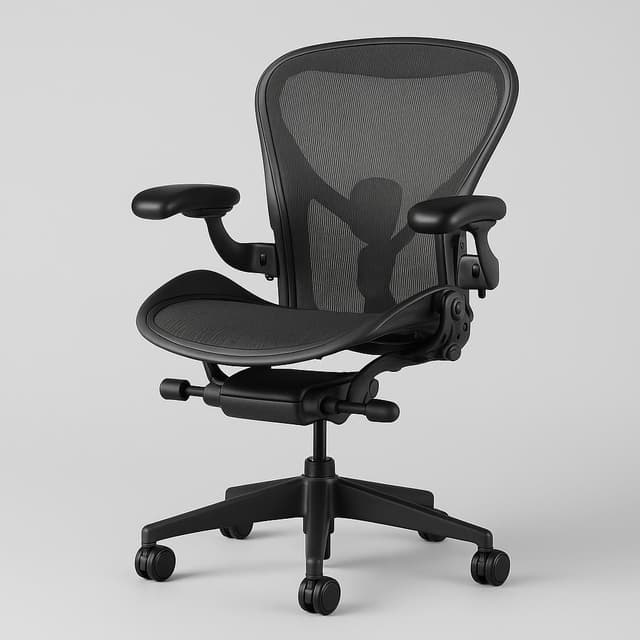
Best for breathable mesh and lumbar support
The Herman Miller Aeron Gaming Chair is the gold-standard ergonomic task chair for serious all-day gamers, with best-in-class PostureFit SL lumbar support and breathable Pellicle mesh — held back only by a steep $2,300 new price and the absence of any headrest.
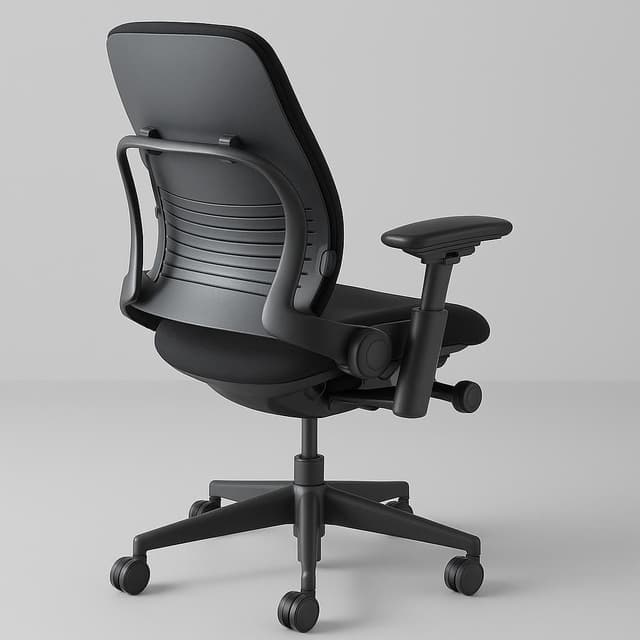
Best dynamic lumbar for all-day sessions
The Steelcase Leap V2 is the gold-standard ergonomic task chair for all-day gaming, delivering dynamic LiveBack lumbar support, best-in-class 4-way arms, and proven 12+ year durability — the thin seat pad and high new-unit price are the only notable trade-offs.
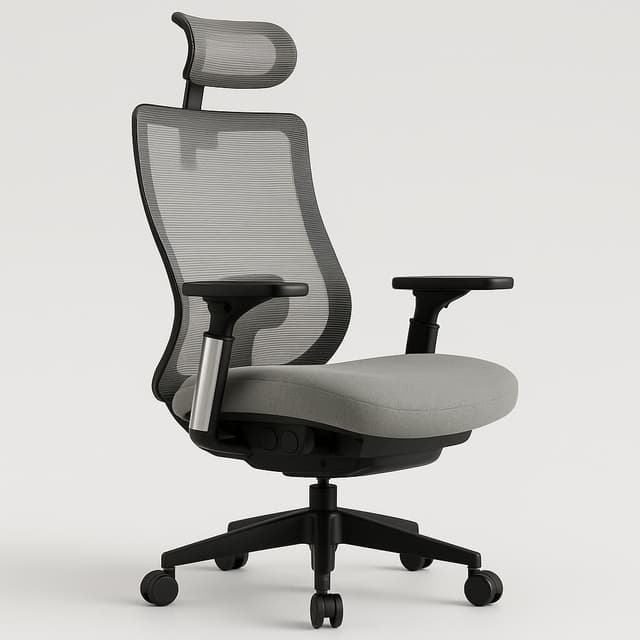
Best build quality under budget
The Colamy Atlas is widely regarded as the best-built ergonomic chair under $300, with 4D armrests, sliding seat depth, synchro-tilt recline, and aluminum base — but its hard-plastic lumbar support (no padding, no dynamic adjustment) is a notable limitation for all-day gaming users who need sustained lower-back relief.
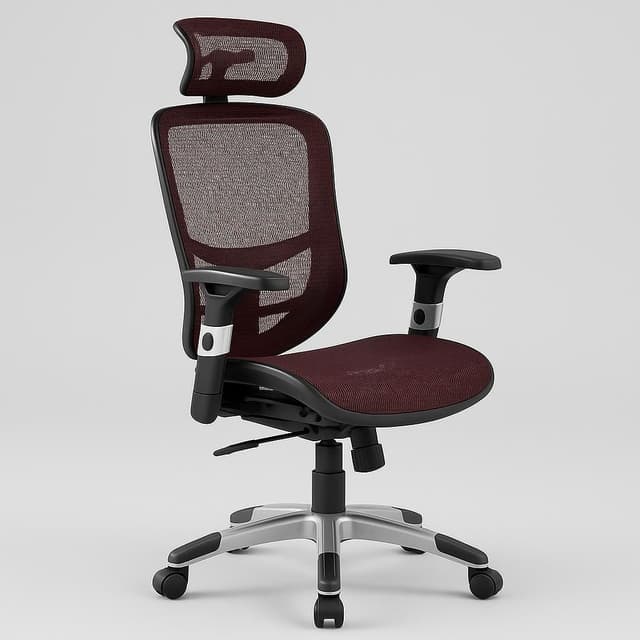
Best entry-level mesh task chair
The Hyken checks ergonomic boxes on paper but fails on execution: only 2D arms, just 1 inch of lumbar adjustment range, no seat depth adjustment, documented QC failures out of box, and components that experts flag as insufficient for sessions beyond 4 hours — making it a budget starter at best, not a genuine all-day gaming chair.
Who this is for
This guide is built for the ergonomic gaming chair shopper: someone logging 4–8 or more hours daily at a desk who wants the postural benefits of a premium task chair without sacrificing the flexibility that gaming postures demand. If you've been tolerating a racing-style bucket seat or a basic office chair and your lower back is paying for it by hour three, this is the category worth your attention.
The central problem this guide addresses is a real tradeoff. Chairs marketed as gaming chairs often prioritize aesthetics — aggressive styling, bold colorways, fixed lumbar pillows — over the adjustability that actually keeps your spine aligned across a marathon session. Meanwhile, premium ergonomic task chairs from brands like Herman Miller and Steelcase are engineered for posture but weren't designed with gaming postures in mind. The picks here sit at the intersection: chairs with dynamic or actively adjustable lumbar mechanisms, comprehensive armrest range, and tilt systems that accommodate both upright work and reclined gaming without forcing you to adapt your body to the chair.
Lumbar support is the single most important differentiator in this category, and the brief is direct about why: dynamic or actively adjustable lumbar mechanisms sustain spinal alignment across marathon sessions far better than fixed pads. If a chair only offers a static foam pillow strapped to the back, it belongs in a different category. The picks here are evaluated specifically on lumbar mechanism type — whether passive, dynamic, or adjustable PostureFit-style — because that distinction separates chairs that feel fine for an hour from chairs that hold up across an eight-hour session.
Adjustability range matters almost as much. The goal is a chair that fits you, not one you adapt to. That means seat-depth adjustment for different leg lengths, 4D armrests that move in, out, forward, back, and at an angle, and a recline with multiple tilt-lock positions. Chairs that only offer height adjustment and a basic tilt are excluded from consideration here, regardless of brand reputation.
The budget range covered runs from roughly $150 to $2,300. That's a wide spread, and the right price point depends on how many hours you're sitting and how long you expect the chair to last. Build quality and mechanism durability — backed by multi-year owner reports, not just launch-window reviews — are weighted heavily in the evaluation. A $400 chair that develops a creaking tilt mechanism in 18 months is a worse value than a $900 chair still performing at year five.
This guide is also written for people who work from home or use their gaming setup as a dual work-and-play environment. Office-appropriate design is a real consideration here: chairs that don't announce themselves as gaming hardware are explicitly preferred. If your setup is in a shared space or you're on video calls, a chair that looks like it belongs in a race car is a practical liability.
If you're shopping for a dedicated racing-style gaming chair — DXRacer, Secretlab Titan in full bucket-seat trim — this guide won't serve you. Those chairs are excluded not because they're bad products, but because they optimize for a different set of priorities than ergonomic long-session support. Similarly, if you're looking for a basic task chair for occasional use under two hours a day, the price points and feature depth here are likely overkill. An adjacent guide focused on budget office chairs under $300 would be a better starting point.
How we picked the best
Our agents evaluated office chairs for gaming across three price tiers — from $300 accessible picks to $2,300 premium workhorses — scoring each on the factors that determine whether a chair holds up through an eight-hour session or leaves you reaching for a heating pad. Every criterion below is drawn from long-term owner reports, ergonomic specifications, and head-to-head comparisons of the top contenders.
Lumbar & Posture Support
Dynamic or actively adjustable lumbar mechanisms sustain spinal alignment across marathon gaming sessions far better than fixed foam pads — this single factor separated the top picks from the also-rans more than any other spec. We looked for chairs that deliver consistent, evidence-backed support rather than relying on brand reputation alone.
All-Day Seated Comfort
Seat pan depth, foam density, and mesh breathability together determine whether fatigue sets in after two hours or eight — a critical threshold for serious gaming sessions. We evaluated how each chair's materials and geometry perform over extended use, not just a brief showroom sit.
Adjustability Range
Comprehensive height, armrest, tilt, and seat-depth adjustments allow the chair to fit your body rather than forcing you to adapt to it — essential for the wide range of body types and desk setups gamers bring. Chairs that covered more adjustment axes scored higher, especially for users outside average height and weight ranges.
Build Quality & Durability
Mechanism reliability and upholstery longevity reported by multi-year owners separate chairs worth the investment from those that degrade within 18 months. We weighted long-term owner feedback heavily, since a chair that feels great at unboxing but develops wobble or foam compression by year two is a poor value at any price.
Office-Appropriate Design
Task-chair aesthetics that work in a home office or professional setting — without racing-bucket styling — are a core requirement for this category. We favored chairs that look at home in a Zoom call background as much as a late-night gaming session.
Value Within Price Tier
With prices ranging from about $150 to $2,300, raw cost means little without context — we scored each chair on the ergonomic return it delivers relative to its tier competitors. A mid-range chair that matches premium lumbar performance at half the price scores higher than a flagship model with marginal real-world advantages.
Herman Miller Aeron Gaming Chair
The Herman Miller Aeron Gaming Chair is the gold-standard ergonomic task chair for serious all-day gamers, with best-in-class PostureFit SL lumbar support and breathable Pellicle mesh — held back only by a steep $2,300 new price and the absence of any headrest.
 Top Pick
Best for breathable mesh and lumbar support
Herman Miller Aeron Gaming Chair
Key specs
| Base | Polished / Satin Aluminum five-star |
| Brand | Herman Miller |
| Price | $2,300 (gaming edition) |
| Style | Modern |
| Leg Type | Caster, Multi-Surface Caster with Quiet Roll |
| Warranty | 12 years |
| Back Type | 8Z Pellicle suspension material |
| Base Type | Five-star base |
Highlights
- PostureFit SL supports both sacral and lumbar regions independently — eliminates lower-back fatigue for 6–10 hour sessions
- 8Z Pellicle suspension mesh is exceptionally breathable with no heat buildup
- ~140° smooth recline with adjustable tilt tension and forward tilt option
- 4D adjustable arms suitable for keyboard/mouse gaming ergonomics
- 12-year warranty and aluminum construction built to last 15–20 years
- Certified refurb market at ~$450–$600 makes it accessible at a lower price point
Worth knowing
- No headrest — significant omission for reclined gaming use
- New gaming edition costs $2,300 — among the most expensive in the roundup
- Limited armrest vertical range for some desk setups
- Sizing complexity (A/B/C) requires correct selection; no one-size-fits-all
- Color options limited on gaming edition
What people are saying
“Herman Miller has an amazing warranty of 12 years and their warranty service is amazing by the way — they send you this like custom Herman Miller box and all you do is open it and you just slide your chair right in.”
“In an ideal sitting position you should not be locked 90 degrees perpendicular to the ground because it puts a lot of pressure on your lower back, instead you want to be able to tighten the tension knob so you come into a more natural catch position.”
“I've done that for about a hundred different aerons now so I know these chairs in and out... I've sat in chairs that are 20 years old that felt perfectly fine.”
Steelcase Leap V2
The Steelcase Leap V2 is the gold-standard ergonomic task chair for all-day gaming, delivering dynamic LiveBack lumbar support, best-in-class 4-way arms, and proven 12+ year durability — the thin seat pad and high new-unit price are the only notable trade-offs.
 Runner Up
Best dynamic lumbar for all-day sessions
Steelcase Leap V2
Key specs
| Brand | Steelcase |
| Color | Black |
| Style | Classic office chair look |
| Width | 18 in |
| Height | 32 in |
| Length | 27 in |
| Leg Type | Casters |
| Warranty | 12-year |
Highlights
- LiveBack technology dynamically flexes with spine for continuous lumbar support
- 4-way adjustable armrests ideal for gaming and keyboard/mouse posture
- Adjustable lumbar tension (side knob) with height adjustment — noticeably effective for back pain
- Five tilt-limit settings for controlled gaming recline up to 120 degrees
- Exceptional long-term durability — 12-year warranty, chairs from 2006 still functional
- Fits users 5'2"–6'6", up to 400 lbs capacity
- Certified refurbished units available at ~$459–$640 for budget-conscious buyers
Worth knowing
- Thin seat pad may feel insufficient for users preferring plush cushioning
- High new-price entry (from ~$1,499)
- Headrest add-on (~$180) pushes head forward and drifts from position
- 14-day return window on Steelcase.com
- No gaming aesthetic — purely a task-chair look
What people are saying
“Both of the chairs include a 3D live back that supports my back really comfortably, but the included adjustable lumbar support and the ability to adjust the lower back firmness makes it just a little better for dialing it all in on the leap.”
“When you recline the back on the leap, the seat pan moves forward which I find comfortable since it keeps the lumbar support in the same spot on my back. But when you compare this to the gesture the seat doesn't move so the lumbar support slides up my back requiring me to reposition myself slightly for maximum comfort.”
“The cushion padding on the Leap is just a little softer and with the round seat cushion design it's more comfortable if I'm going to cross my legs on the seat.”
Colamy Atlas Ergonomic Office Chair
The Colamy Atlas is widely regarded as the best-built ergonomic chair under $300, with 4D armrests, sliding seat depth, synchro-tilt recline, and aluminum base — but its hard-plastic lumbar support (no padding, no dynamic adjustment) is a notable limitation for all-day gaming users who need sustained lower-back relief.
 Alternate Angle
Best build quality under budget
Colamy Atlas Ergonomic Office Chair
Key specs
| Brand | COLAMY |
| Color | Gray |
| Style | Modern |
| Wheels | Large dual-purpose casters (smooth-rolling) |
| Recline | Synchro-tilt with adjustable tension and back lock |
| Arm Type | Adjustable Arms |
| Armrests | 4D adjustable (4-way) |
| Headrest | Adjustable, mesh-covered |
Highlights
- Best-in-class build quality under $300 (reviewer's top pick in segment)
- Sliding seat depth adjustment — rare at this price, mimics Steelcase Gesture
- 4D armrests with generous adjustment range
- Synchro-tilt recline with adjustable tension and lock
- Reinforced aluminum alloy base for long-term durability
- 3-year warranty and BIFMA certified
Worth knowing
- Lumbar support is hard plastic with no padding — pressure discomfort risk for extended sessions
- Armrest depth adjustment disengages during recline — gap forms
- Slanted seat cushion edges may reduce effective seat surface for wider users
- Coarse mesh texture snags clothing
What people are saying
“I have the Atlas and its awesome. some people say they don't like the lumbar support. Never had an issue with it but I'm pretty sure you can remove it.”
“Colamy Atlas is solid! Of course there's refurbished options like a Steelcase leap v2 from BTOD, but if your budget is $400 max then you can't go wrong with the Colamy Atlas, it's a solid chair for that price.”
“I bought the atlas off amazon and was glad I did because the return was free.”
Staples Hyken Technical Mesh Task Chair
 Worth a look
Best entry-level mesh task chair
Staples Hyken Technical Mesh Task Chair
Key specs
| Brand | Staples |
| Color | Red |
| Depth | 27.3 in deep |
| Style | Task |
| Width | 27.2 in wide |
| Swivel | Yes |
| Arm Type | Adjustable Arms |
| Leg Type | Casters |
What people are saying
Notable mentions


Herman Miller Aeron Remastered
Hermanmiller — $1,523

Clatina Mellet Ergonomic Office Chair
eBay — $111

Branch Ergonomic Chair Pro
Branch Furniture — $499Key spec comparison
How the top picks compare
Side-by-side scores on the dimensions that mattered for this search.
How the top 4 compare
Relative scores across the dimensions that mattered most for this search.
Herman Miller Aeron Gaming Chair
Steelcase Leap V2
Colamy Atlas Ergonomic Office Chair
Staples Hyken Technical Mesh Task Chair
Price vs. Warranty Length
How price changes against warranty length for which chairs genuinely relieve back pain across 6+ hour gaming sessions.
Top pick
Other top options
What to know before buying
What is the best office chair for lumbar support during long gaming sessions?
The Herman Miller Aeron Gaming Chair is the top pick, scoring 98/100 for lumbar support thanks to its PostureFit SL dual sacral and lumbar system.
Herman Miller Aeron Gaming Chair vs Steelcase Leap V2 — which is better for all-day gaming?
The Herman Miller Aeron Gaming Chair wins for static posture support (96/100 all-day comfort), but the Steelcase Leap V2's LiveBack technology adapts dynamically to every posture shift.
Does the Herman Miller Aeron Gaming Chair have a headrest?
No — the Herman Miller Aeron Gaming Chair has no integrated headrest, making it a notable drawback for gamers who recline during play.
Is the Colamy Atlas Ergonomic Office Chair durable enough for daily all-day use?
It's a risk — at least one user reported the Colamy Atlas seat completely bottomed out after just 2 months, and its foam durability is unconfirmed for heavy daily use.
Is the Steelcase Leap V2 worth the price for gaming compared to cheaper chairs?
Yes — the Steelcase Leap V2 scores 97/100 for build quality with a 12-year warranty, far outclassing budget alternatives like the Colamy Atlas (82/100, 3-year warranty).
Skip this one
Not worth it
Secretlab TITAN Evo 2022
The Secretlab TITAN Evo 2022 is a PCMag Editors' Choice (4.5/5) gaming chair with genuine ergonomic features — an adjustable L-ADAPT lumbar dial, 4D CloudSwap armrests, and durable NEO Hybrid leatherette — but retains a racing-bucket form factor that separates it from true task-chair ergonomics (no mesh, no flat seat pan).
- Racing-bucket aesthetics — not a traditional ergonomic task-chair form factor
- Leatherette retains heat; no mesh version available
- Lumbar is mechanical/integrated, not a dynamic flex-back like Steelcase Leap
- Headrest magnet can shift under head movement
Related reports


Sources reviewed
256 sources checked across 25 products. Showing non-retail research links from the canonical report payload.
Official pages
- AndaSeat Official (andaseat.com)
- Official product page (store.hermanmiller.com)
- Official product page (steelcase.com)
- Official product page (colamyhome.com)
- Official product page (staples.com)
- Official product page (hermanmiller.com)
- Official product page (branchfurniture.com)
- Official product page (corsair.com)
- Official product page (hermanmiller.com)
- Official product page (autonomous.ai)
- Official product page (steelcase.com)
- Official product page (flexispot.com)
- Official product page (razer.com)
- Official product page (fractal-design.com)
- Official product page (secretlab.co)
- Official product page (store.haworth.com)
- Official product page (sihoooffice.com)
- Official product page (andaseat.com)
- Official product page (fractal.design)
- Official product page (steelcase.com)
- Official product page (store.haworth.com)
- Official product page (razer.com)
- Sihoo Official (uk.sihoooffice.com)
Reviews and articles
Videos and social
- Ascend the Secretlab TITAN Evo 2022 House ... - Instagram (instagram.com)
- COLAMY ATLAS users be like: Which vibe are you? 🖤 # ... (instagram.com)
- Comparing Herman Miller Aeron and Embody Chairs (tiktok.com)
- Echo Esports Secretlab TITAN Evo 2022 Review (tiktok.com)
- Elevate your workday comfort with the Colamy Atlas ... (instagram.com)
- Every detail, designed to support you. The COLAMY ... (instagram.com)
- Experience Comfort with Secretlab TITAN Evo Chair (tiktok.com)
- Herman Miller Aeron Chair Remastered - NOW available at Kelly's (instagram.com)
- Herman Miller Aeron Chair: Iconic Comfort and Design (tiktok.com)
- Hyken XL Big & Tall Chair for Ultimate Comfort (tiktok.com)
- IKEA TROTTEN (manual standing desk) Chair (instagram.com)
- in 2006 my dad had a spare herman miller aeron chair at ... (instagram.com)
- Leap has been recognized by Forbes Vetted as Best Office ... (instagram.com)
- Meet the COLAMY Atlas — ergonomic design, redefined. 👀Built ... (instagram.com)
- Meet the next evolution of comfort. The Hyken Chair is now ... (instagram.com)
- Meet the Ultimate Comfort Combo The Steelcase Leap V2 + ... (instagram.com)
- Replying to @LexaT_T Secretlab Titan Evo 2022: One Year ... (tiktok.com)
- secretlab - Instagram (instagram.com)
Showing 42 research links; 188 additional non-retail links remain in the source data.